This article is an AI-assisted translation of the original French content.
Update of 23/04/2026: more precise description of property resolution in Spring
UML diagrams are difficult to read in dark display mode: it is recommended to switch to light mode (button at the bottom right of the page)
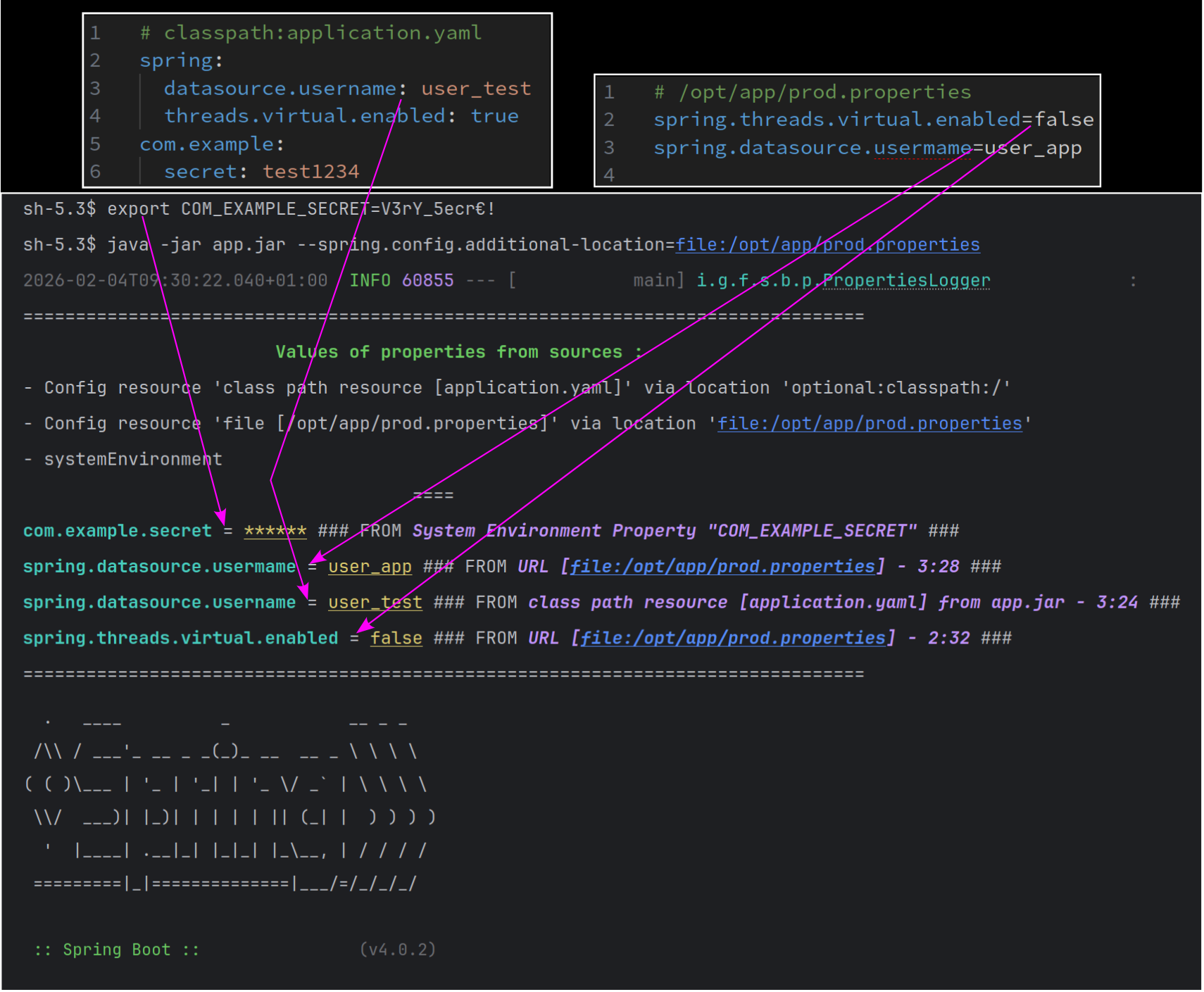
Spring Boot has an extremely rich external configuration feature allowing applications to be configured from very varied sources (files in the classpath, external files, environment variables, system properties, command-line arguments, Servlet context …). The multiplicity of sources can sometimes lead to confusion and result in incorrect application configuration. All the more so because the misconfigured property can be difficult to identify if it prevents the application from starting and displaying enough logs to diagnose the problem.
This post presents a solution to this problem: the early display of the properties used in the application with the value actually taken into account by Spring Boot and an indication of the source from which this value originates. In order to present a solution for displaying the properties available in the application and their origin, we will see:
- How does Spring Boot manage properties and resolve their values?
- How to know the property keys available in a Spring application?
- How to know the origin of a property’s value using Spring Boot’s
OriginAPI? - How to display properties as early as possible in the application lifecycle?
How does Spring Boot manage properties and resolve their values? Link to heading
The hierarchical property management on the Spring Framework side is handled by the classes in the org.springframework.core.env package.
The common usage for properties in Spring consists of resolving the value of a property in a given Environment
knowing its key using the Environment.getProperty method. To understand how to list properties and
their origins, we will go deeper into the exploration of the property management mechanism in Spring.
Property management in Spring Framework is modeled essentially through 3 classes / interfaces:
PropertySource<T>which serves to embody a source of key/value pairs (the properties) that share a common origin (properties file, command-line arguments, environment variables).Trepresents the underlying type that contains the properties (for examplejava.util.Properties,java.util.Map).PropertySourceswhich aggregates thePropertySource<T>into a single collection for a given Spring environment. In practice, it is the implementationMutablePropertySourcesthat is used.PropertyResolverwhich allows property resolution for a Spring environment within aPropertySourcesinstance while respecting the precedence rules betweenPropertySources.
The diagram below presents the 4 classes / interfaces mentioned above with the links between them and the environment (only the components relevant for understanding are represented):
The diagram below presents the class hierarchy of PropertySources (only
the components relevant for understanding are represented):
The diagram below presents the class hierarchy of PropertyResolver (only
the components relevant for understanding are represented):
The diagram below presents the class hierarchy of PropertySource<T> (only
the components relevant for understanding are represented):
Property detection at Spring Boot startup Link to heading
When launching a Spring Boot application,
most property sources are read and their properties loaded into memory at the time of the
Environment creation, which is performed by the org.springframework.boot.SpringApplication#prepareEnvironment method.
Furthermore, the property sources are also referenced by a MutablePropertySources object
in the correct order to follow the precedence rules defined at the level of
the external configuration feature.
Since the environment creation occurs very early in the application lifecycle (it is the first thing done after loading the listeners), the ordered properties and their values are therefore available before the application context is loaded and before they are used by beans.
Property resolution principle in Spring according to precedence rules Link to heading
We have seen that at the time of property loading, the property sources are referenced by a
MutablePropertySources object in a well-defined order that respects the precedence defined at
the level of the external configuration feature: the PropertySources are
referenced in a collection ordered by decreasing priority.
In Spring as in Spring Boot, when implementations of PropertyResolver
need to resolve the value of a property via the getProperty(String key)
or getProperty(String key, Class<T> targetType) methods, they iterate over the collection ordered
by decreasing priority of PropertySource
from the associated MutablePropertySources object and return the value as soon as a PropertySource provides a value for the
requested property key. Thus, precedence in property resolution is respected.
Spring Boot-specific objects for representing properties Link to heading
Spring Boot uses specific objects to represent properties and their sources in order to provide
additional features: properties are represented by instances of the ConfigurationProperty class.
This class represents a property with the following data:
- the property name as an instance of
ConfigurationPropertyName - the property value
- the source to which the property belongs
- the origin of the property (and its value) as an instance of
Origin
The use of ConfigurationPropertyName
to represent the property name allows Spring Boot to offer richer features for property management
such as relaxed binding for ConfigurationProperties.
The use of Origin
allows indicating the origin of a property: this is the data that will allow solving the problem of early
display of properties with their value and their origin.
The property value resolution algorithms
follow the same implementations (the difference lies in the metadata that enriches the Spring Boot objects)
between Spring core and Spring Boot, so the Spring Boot equivalents of PropertySource<T> and associated objects
can be used to access properties.
Mapping between Spring and Spring Boot objects for representing properties and their sources Link to heading
| Spring core | Spring Boot | |
|---|---|---|
| Property name (key) | String | ConfigurationPropertyName |
| Key-value pair | Varies depending on the case (for example Map.Entry) | ConfigurationProperty |
| Property source | PropertySource | ConfigurationPropertySource |
| Set of property sources | PropertySources (actually MutablePropertySources) | SpringConfigurationPropertySources |
| Property resolver for a set of sources | PropertyResolver | ConfigurationPropertySourcesPropertyResolver |
NB: the
SpringConfigurationPropertySourcesclass is not public and access to the variousConfigurationPropertySourceinstances of an environment is done through the static methodConfigurationPropertySource#from
How to know the property keys available in a Spring application using PropertySources?
Link to heading
In order to display the properties available in a Spring Boot application, it is necessary to be able to list the
available keys from a Spring Environment. This can be done in two steps:
- List the
PropertySources of theEnvironment - For each
PropertySource, list the property names
ConfigurableEnvironment to enumerate the PropertySources of the Environment
Link to heading
ConfigurableEnvironment
provides access to the PropertySource objects referenced by the environment via the
ConfigurableEnvironment#getPropertySources method, which returns an object of type MutablePropertySources (which allows iterating
over the PropertySources it references). Almost all Environments in Spring are ConfigurableEnvironments:
it is therefore sufficient to retrieve the application’s Environment instance and cast it to ConfigurableEnvironment.
The Environment instance itself can be retrieved via ApplicationContext#getEnvironment once the application is initialized,
or much earlier via ApplicationEnvironmentPreparedEvent in the case of a Spring Boot application.
EnumerablePropertySource to list property names
Link to heading
EnumerablePropertySource
allows enumerating the names of the properties that make up the source through the
getPropertyNames method. Most property sources (files, system properties,
command-line arguments …) are of type EnumerablePropertySource and therefore allow knowing
the properties they bring to the application context. Non-enumerable property sources such as
JndiPropertySource remain in the minority.
Code block summarizing the elements presented in this section Link to heading
public Set<String> findAllPropertyKeys(ApplicationContext applicationContext) {
    return ((ConfigurableEnvironment) applicationContext.getEnvironment()).getPropertySources().stream()
            .filter(EnumerablePropertySource.class::isInstance)
            .map(EnumerablePropertySource.class::cast)
            .map(EnumerablePropertySource::getPropertyNames)
            .flatMap(Arrays::stream)
            .collect(Collectors.toSet());
}
How to know the origin of a property’s value using Spring Boot’s Origin API?
Link to heading
When the same property (same key) is present in multiple property sources simultaneously, its value will be determined by following the precedence rules defined at the level of the external configuration feature. In some situations, the multiplicity of sources as well as the flexibility offered on property names by Spring can make it difficult to determine which value Spring will actually use for a property. This is why it can be useful to determine the origin of a property’s value.
The Origin API of Spring Boot
Link to heading
As seen above, the origin of a property
is represented in Spring Boot through an instance of the org.springframework.boot.origin.Origin interface
associated with a ConfigurationProperty.
The Origin instance may provide information about the origin of the value embodied by ConfigurationProperty#value
via for example a call to Origin#toString, whose return values take the form:
class path resource [application.properties] - 2:29
The example output indicates that the value comes from the application.properties file found by Spring Boot in the
classpath and is located at line 2, column 29 (the column indicates the first character of the property value after
the = and any whitespace that follows it).
Accessing the Origin of a property in a given source
Link to heading
As indicated in the table above,
it is a ConfigurationPropertySource object
that allows accessing the properties of a Spring PropertySource as ConfigurationProperty instances.
This can be done through the ConfigurationPropertySource#getConfigurationProperty method by passing
an instance of ConfigurationPropertyName (property name).
The ConfigurationPropertySource object associated with a property source can be obtained via
a call to ConfigurationPropertySource#from.
As for the ConfigurationPropertyName instance, it is obtained from the static factory ConfigurationPropertyName#of
with the property name (key) as argument.
How to determine the correct origin Link to heading
With the principle stated above, there will be as many origins for a property as there are property sources
providing a value for the key. In order to find the origin that corresponds to the value retained by Spring Boot
in accordance with the precedence between PropertySources, the same resolution algorithm as
the one defined above must be followed.
The solution therefore consists of checking the Origin objects returned by each PropertySource (previously
converted to ConfigurationPropertySource) while respecting the order in which the PropertySources are stored
in the MutablePropertySources object associated with the environment. The first non-null Origin object corresponds
very likely to the origin of the value that Spring Boot will return for the property.
The elements presented in this section can be summarized with the following code block Link to heading
public Optional<String> findPropertyOrigin(String key, ApplicationContext applicationContext) {
    ConfigurationPropertyName configurationPropertyName = ConfigurationPropertyName.of(key);
    Environment environment = applicationContext.getEnvironment();
    return ((ConfigurableEnvironment) environment).getPropertySources().stream()
            .map(ConfigurationPropertySource::from)
            .filter(Objects::nonNull)
            .map(configurationPropertySource -> configurationPropertySource.getConfigurationProperty(configurationPropertyName))
            .filter(Objects::nonNull)
            .map(ConfigurationProperty::getOrigin)
            .filter(Objects::nonNull)
            .map(Origin::toString)
            .findFirst();
}
How to display properties as early as possible in the application lifecycle? Link to heading
The value of displaying properties as early as possible Link to heading
The display of properties in applications sometimes happens during the instantiation of a bean or the
call to a @PostConstruct method. However, if an incorrectly valued property causes the creation or
refresh of the application context to fail, the bean responsible for displaying the properties
may never be instantiated. Thus the application stops without any indication of the property values used.
The following method allows guarding against all of this.
SpringApplicationEvent related to the environment creation
Link to heading
When a Spring Boot application starts, most properties are resolved early in the application lifecycle
(see the documentation on Spring Boot listeners for an overview of a Spring Boot application’s lifecycle):
at the time of the Environment creation, which coincides with the emission of the ApplicationEnvironmentPreparedEvent event.
From that moment on, most property sources have been inspected by Spring Boot and the property values resolved: it is therefore possible from that moment to retrieve the values actually used for the properties
as well as their origins.
Retrieving properties and their origins from ApplicationEnvironmentPreparedEvent
Link to heading
The ApplicationEnvironmentPreparedEvent event emitted by Spring Boot allows retrieving the Environment object just after its
creation and before Spring begins other phases of the application startup. The Environment instance is retrieved by registering as a Spring Boot application listener
a class implementing ApplicationListener<ApplicationEnvironmentPreparedEvent>. The Environment will be available via the
ApplicationEnvironmentPreparedEvent object passed to the onApplicationEvent method.
Bringing together the code seen above in a class for displaying properties at environment creation Link to heading
Combined with the other examples presented above, here is what the main class of an application might look like when displaying its properties, their values and their origins as soon as its environment is created:
package poc;

import org.springframework.boot.autoconfigure.SpringBootApplication;
import org.springframework.boot.builder.SpringApplicationBuilder;
import org.springframework.boot.context.event.ApplicationEnvironmentPreparedEvent;
import org.springframework.boot.context.properties.source.ConfigurationProperty;
import org.springframework.boot.context.properties.source.ConfigurationPropertyName;
import org.springframework.boot.context.properties.source.ConfigurationPropertySource;
import org.springframework.boot.context.properties.source.InvalidConfigurationPropertyNameException;
import org.springframework.boot.origin.Origin;
import org.springframework.context.ApplicationListener;
import org.springframework.core.env.ConfigurableEnvironment;
import org.springframework.core.env.EnumerablePropertySource;

import java.util.Arrays;
import java.util.List;
import java.util.Objects;
import java.util.Optional;
import java.util.stream.Stream;

@SpringBootApplication
public class Main {
    void main(String[] args) {
        new SpringApplicationBuilder(Main.class)
                .listeners((ApplicationListener<ApplicationEnvironmentPreparedEvent>) Main::onApplicationEvent)
                .build().run(args);
    }

    private static void onApplicationEvent(ApplicationEnvironmentPreparedEvent event) {
        final ConfigurableEnvironment configurableEnvironment = event.getEnvironment();
        final List<ConfigurationPropertySource> configurationPropertySources = extractConfigurationPropertySources(configurableEnvironment);
        findAllPropertyKeys(configurableEnvironment)
                .map(key -> {
                    String value = configurableEnvironment.getProperty(key);
                    Optional<String> origin = findPropertyOrigin(key, configurationPropertySources);
                    return key + " = " + value + origin.map(" ### FROM "::concat).orElse("");
                })
                .forEach(IO::println);
    }

    private static List<ConfigurationPropertySource> extractConfigurationPropertySources(ConfigurableEnvironment configurableEnvironment) {
        return configurableEnvironment.getPropertySources().stream()
                .map(ConfigurationPropertySource::from)
                .filter(Objects::nonNull)
                .toList();
    }

    private static Stream<String> findAllPropertyKeys(ConfigurableEnvironment configurableEnvironment) {
        return configurableEnvironment.getPropertySources().stream()
                .filter(EnumerablePropertySource.class::isInstance)
                .map(EnumerablePropertySource.class::cast)
                .map(EnumerablePropertySource::getPropertyNames)
                .flatMap(Arrays::stream)
                .distinct();
    }

    private static Optional<String> findPropertyOrigin(String key, List<ConfigurationPropertySource> configurationPropertySources) {
        try {
            final ConfigurationPropertyName configurationPropertyName = ConfigurationPropertyName.of(key);
            return configurationPropertySources.stream()
                    .map(configurationPropertySource -> configurationPropertySource.getConfigurationProperty(configurationPropertyName))
                    .filter(Objects::nonNull)
                    .map(ConfigurationProperty::getOrigin)
                    .filter(Objects::nonNull)
                    .map(Origin::toString)
                    .findFirst();
        } catch (InvalidConfigurationPropertyNameException e) {
            return  Optional.empty();
        }
    }
}
NB: Even though it is very likely that the origin and value displayed for the property will be those taken into account by Spring Boot, this is not guaranteed: some property sources are resolved during the creation of the application context (as Spring Beans or by Spring Beans) therefore after the environment creation and the execution of the above code. This is the case for example for files referenced by
@PropertySourceannotations, properties introduced by@DynamicPropertySource-annotated methods in tests, or properties coming from servlet container initialization parameters.
Using a third-party library to systematically display property content and origin in a Spring Boot application Link to heading
By integrating the code above into a Spring Boot application, you will benefit from early display of properties with their values and their origins. However, other aspects will still need to be managed:
- limiting the properties that will be displayed (if the output is too verbose)
- limiting the sources used to retrieve property keys (if the output is too verbose)
- masking secrets
- avoiding exceptions for properties that depend on missing placeholders
- reporting non-enumerable property sources
- formatting the output to make properties and their values readable
- being able to disable the display
Furthermore, integrating the code via copy-paste is a bad practice and it is preferable to attach the property display process to the existing application without modifying its code, for example by adding a dependency to the classpath.
This is what the Spring-Boot-Properties-Logger library offers, providing all the above services simply by adding it to the application’s dependencies and configuring a few properties to parameterize it:
<dependency>
    <groupId>io.github.fbibonne</groupId>
    <artifactId>boot-properties-logger-starter</artifactId>
    <version>2.3.0</version>
</dependency>
# Display Spring properties as well as properties from the com.example domain based on key prefixes
properties.logger.prefix-for-properties=debug, trace, info, logging, spring, server, management, springdoc, properties, com.example
The Spring-Boot-Properties-Logger library manages the display of properties, their values and their origins, as well as the detected property sources. The detected property sources as well as the properties whose secrets are to be masked are also configurable.
In order to register as a listener with the Spring Boot application without modifying the application code, the
Spring-Boot-Properties-Logger library uses the spring.factories files mechanism.
A spring.factories file containing the name of the listener provided by the library implementing org.springframework.context.ApplicationListener
is found in the META-INF folder of the library’s jar: it is through this mechanism that the listener in question
is passed to the Spring Boot application and called when the ApplicationEnvironmentPreparedEvent event is emitted.